Thinking in Threads
A Mental Framework for Scaling Your Agentic Workflows


Last month, a colleague asked me a question I couldn’t answer: “Are you actually getting better at this AI-assisted coding thing, or just feeling busier?”
Ouch! 🥲
How do you actually know you’re improving as an engineer in the age of AI agents?
I don’t mean feeling more productive. I mean measuring it. Quantifying it. Knowing that today-you ships faster than yesterday-you.
Even Andrej Karpathy, one of the most accomplished engineers of our generation, recently admitted he feels left behind: “I’ve never felt this much behind as a programmer... The profession is being decomposed... I have a sense that I could be 10X more powerful if I just properly string together what has become available over the last ~year”

If he feels the pressure, what hope do the rest of us have?
The answer, it turns out, is simpler than I expected: think in threads!
I’ve been using a mental framework called “Thread-Based Engineering” for a while now (big shoutout to IndyDevDan for coining the term and popularizing this model). It’s transformed how I reason about my agentic workflows. Instead of vaguely wondering if I’m “using AI well,” I can now visualize exactly where I am, and what levers to pull to level up.
Let’s break it down.
What Is a Thread? 🧵
A thread is a unit of engineering work over time, driven by you and your agents. It has a simple anatomy:
Prompt (P): You define the plan
Agent Work: The agent executes a string of tool calls
Review (R): You validate the output
Every time you open a terminal and fire up an agent, you’re starting a thread. You show up at the beginning (the prompt) and at the end (the review). Everything in between? That’s your AI agents doing the heavy lifting through tool calls.
Here’s the core insight: Tool calls roughly equal impact. Previously, you were the one making the API calls and writing the syntax. Now, the agent does that middle work. Your job shifts to orchestration and validation.
Think of it like this: you’re no longer the chef chopping vegetables, but instead you’re the executive chef designing the menu and tasting the final dish. The prep work happens in the thread.
The Six Thread Types
Not all threads are created equal. Here are six patterns, ranging from basic to advanced:
1. Base Thread: Your Fundamental Unit
This is where everyone starts. One prompt, one Agent session, one Review.
You fire a prompt, the agent works, you review. Rinse and repeat. If you’re only running base threads, you’re leaving compute on the table—but everyone needs to master this before scaling up.
Pro tip: Create an alias to launch your agent with fewer interruptions:
alias cldyo=”claude --dangerously-skip-permissions --model opus”Here’s the breakdown:
--dangerously-skip-permissions: Skips confirmation prompts for faster iteration (use carefully!)--model opus: Specifies the model variant
2. P-Thread: Parallel Execution ⚡
After you’ve nailed the base thread, you scale it horizontally. P-Threads (Parallel Threads) involve running multiple threads simultaneously — same prompt, multiple instances.
Boris Cherny, the creator of Claude Code, admitted to running five Claude instances in parallel in his terminal, numbering his tabs 1-5.


This is the P-Thread in action. Instead of babysitting one agent, you kick off five separate streams of work.
P-Threads shine for tasks where quantity of attempts improves outcomes. Things like code reviews, test generation, or exploring different implementation angles.
Pro tip: Use the fork-terminal skill to spawn parallel agents. You can spawn multiple instances with a single command. Instead of working harder, you’re working wider!
fork terminal: cli, review code in src/api/* and write findings to temp/auth-review.mdHere’s the breakdown:
fork terminal: Spawns new terminal processescli: Uses the default CLI agent (Claude)”review code..”: The prompt the new thread runs
3. C-Thread: Chained Phases 🔗
For high-stakes production work or massive multi-plans, you use C-Threads (Chained Threads). This breaks work into distinct phases with human checkpoints:
Phase 1 → Review → Phase 2 → Review → Phase 3 → ReviewWhen should you reach for C-Threads?
The work doesn’t fit in a single context window
The risk of failure is high, and you need intermediate validation
You’re doing something irreversible (database migrations, production deployments)
C-Threads are effective but expensive. They require high human energy for the review steps. Use them when correctness matters more than speed.
Pro tip: Use these tools to make C-Threads smooth:
AskUserQuestion(): Claude Code’s native tool that pauses execution to ask you clarifying questions mid-threadSystem notifications with TTS: Set up hooks so the agent notifies you when work is done and speaks a synthesis of the result, so no babysitting required
4. L-Thread: Long Duration Autonomy ⏳
L-Threads focus on high autonomy and extended duration without human intervention. We’re talking about prompts that run for hours or days, executing thousands of tool calls.
Boris shared a screenshot of a Claude Code session that ran for over a day:

To make L-Threads work safely, you need a Stop Hook. When the agent tries to declare “I’m done,” the Stop Hook intercepts it, runs deterministic validation (tests, linters, type checks), and if anything fails, forces the agent to keep working.
This is also where the Ralph Wiggum Pattern shines, popularized by Geoffrey Huntley. You put a coding agent into a generic while loop until the task is verified as done:
while ! do cat PROMPT.md | claude-code ; doneHere’s the breakdown:
while ! do: Loop until exit code is successcat PROMPT.md: Feed the prompt file to the agent| claude-code: Pipe to Claude Code; done: Keep going until it works
The agent keeps failing and retrying until it actually passes your deterministic checks. No human babysitting required.
This is the power of the L-Thread: high-autonomy loops that solve problems while you sleep.
But here’s the catch, L-Threads require trust. Trust in your test suite. Trust in your validation hooks. Trust that the agent won’t go off the rails. Build that trust incrementally before letting agents run unsupervised for hours.
Pro tip: Start with Claude’s implementation, you can easily set --max-iterations and start with 10 iterations before jumping to 100. Build your validation hooks incrementally and verify they catch real issues before scaling up.
5. B-Thread: Nested Meta-Structures 🪆
B-Threads (Big Threads) are meta-structures where one thread spawns sub-threads. This is where things get architecturally interesting.
From your perspective as the human, you kick off one prompt and do one review at the very end. That part looks exactly like a base thread. But here’s the difference: what happens in the middle is a black box that YOU’ve engineered.
Inside that black box, you’ve built an Orchestrator Agent. When it receives your prompt, it doesn’t just execute, it delegates! It might spawn:
A Planning Agent to break down the task
A Builder Agent to write the code
A Testing Agent to validate the output
A Review Agent to check for quality
Each of these sub-agents runs its own thread, and the orchestrator coordinates them. You’re creating “thicker” threads by nesting agentic work.
Geoffrey Huntley’s Ralph Wiggum implementation also has a hat-based mode designed exactly for this: specialized personas that the orchestrator switches between depending on the task phase.
Think of it like a startup founder who hires specialists. You (the founder) give one directive: “Build me a feature”. The orchestrator (your COO) breaks it down, assigns sub-tasks, collects results, and reports back with a finished product.
6. F-Thread: Fusion and Selection 🔀
By far the best for rapid prototyping. In an F-Thread (Fusion Thread), you send the same prompt to multiple agents (potentially from different providers) review all results, and then fuse the best pieces into one solution. Here’s an example:
fork three terminals: claude code, codex, and gemini - each should prototype the wake-word detection module for our voice assistant and save to temp/<agent>-wake-word/Here, each agent takes a different approach. Maybe Claude nails the audio processing pipeline but Gemini’s noise filtering is cleaner. Maybe Codex’s streaming implementation is more elegant. You cherry-pick the best pieces and synthesize them into the final solution.
The key step most engineers miss: synthesis! After all agents finish, you aggregate or choose the Best of N or cherry-pick parts from each. You can even have a notification tool with TTS summarize the results to you.
Why this works: By taking more shots on goal, you drastically increase confidence in the final output. You’re essentially using compute to buy quality. Instead of hoping one agent gets it right, you hedge your bets across multiple attempts.
This is where agentic coding becomes ADVANCED! Most engineers aren’t using F-Threads. If you’re running fusion workflows across multiple providers and synthesizing results, you’re already in the top 1% of AI-assisted engineers.
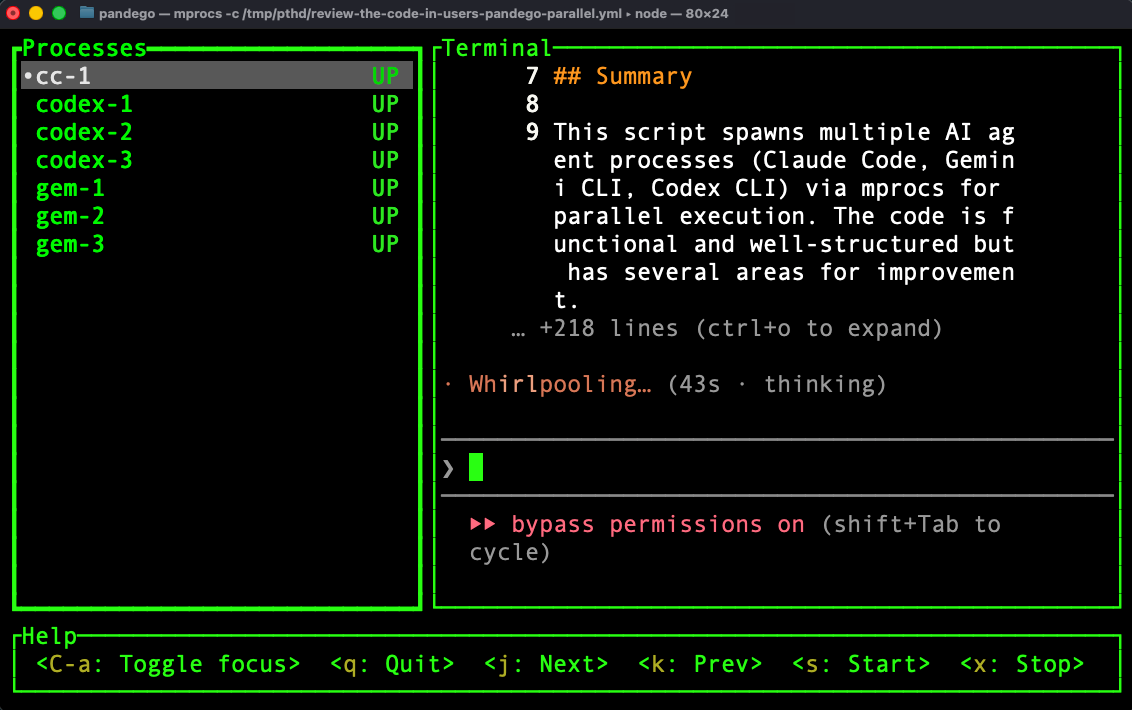
Pro tip: Use the pthd skill. It uses the mprocs tool to orchestrate multi-provider fusion. This skill generates configs like this:
procs:
   cc-1:    { shell: ‘claude “<prompt>”’ }
   gem-1:   { shell: ‘gemini -p “<prompt>”’ }
   codex-1: { shell: ‘codex “<prompt>”’ }
Then it runs mprocs -c /tmp/pthd/<slug>.yml for a tabbed terminal with all agents attacking the same problem.
The Z-Thread: The Holy Grail 🏆
Oh yeah, there’s a seventh thread type: the Z-Thread (Zero Touch). Maximum trust, Zero human review. The agent ships to production autonomously.
To be clear: this is not vibe-coding. Z-Threads require industrial-strength validation, like: comprehensive test suites, type checking, linting, integration tests, staging deployments, automated rollback capabilities. The human review isn’t removed; it’s been encoded into deterministic checks that run automatically.
We’re not quite there yet for most workflows. But every improvement in thread engineering — better hooks, better validation, better agent capabilities — brings us closer. The trajectory is clear: as agents get more capable and our validation gets more rigorous, the gap between L-Threads and Z-Threads shrinks!
How to Know You’re Improving
Now we can answer the original question. Here are four concrete levers to pull:
More Threads → Use P-Threads to parallelize execution → Count of concurrent agents
Longer Threads → Use L-Threads with validation hooks → Duration before human review
Thicker Threads → Use B-Threads to nest agents within agents → Depth of agent orchestration
Fewer Checkpoints → Increase trust to remove human-in-the-loop steps → Review frequency
If you’re running more threads, longer threads, thicker threads, and reviewing less often (because your validation is solid), you’re improving. It’s that simple.
Where to Go Next
Thread-Based Engineering is a mental model, not a library. You can start applying it today with whatever agent tools you’re using.
Try this: Pick one workflow you run regularly. Identify what thread type it is (probably a base thread). Then ask: Could this be a P-Thread? Could I run three instances in parallel and pick the best result?
Start there. Then work your way up the stack.
The future belongs to engineers who can scale their compute through parallel threads, fusion chains, and agentic orchestration. The ceiling keeps moving higher… but now you have a framework to climb with it!
*Unless otherwise noted, all images are by the author.*